 Suro Senen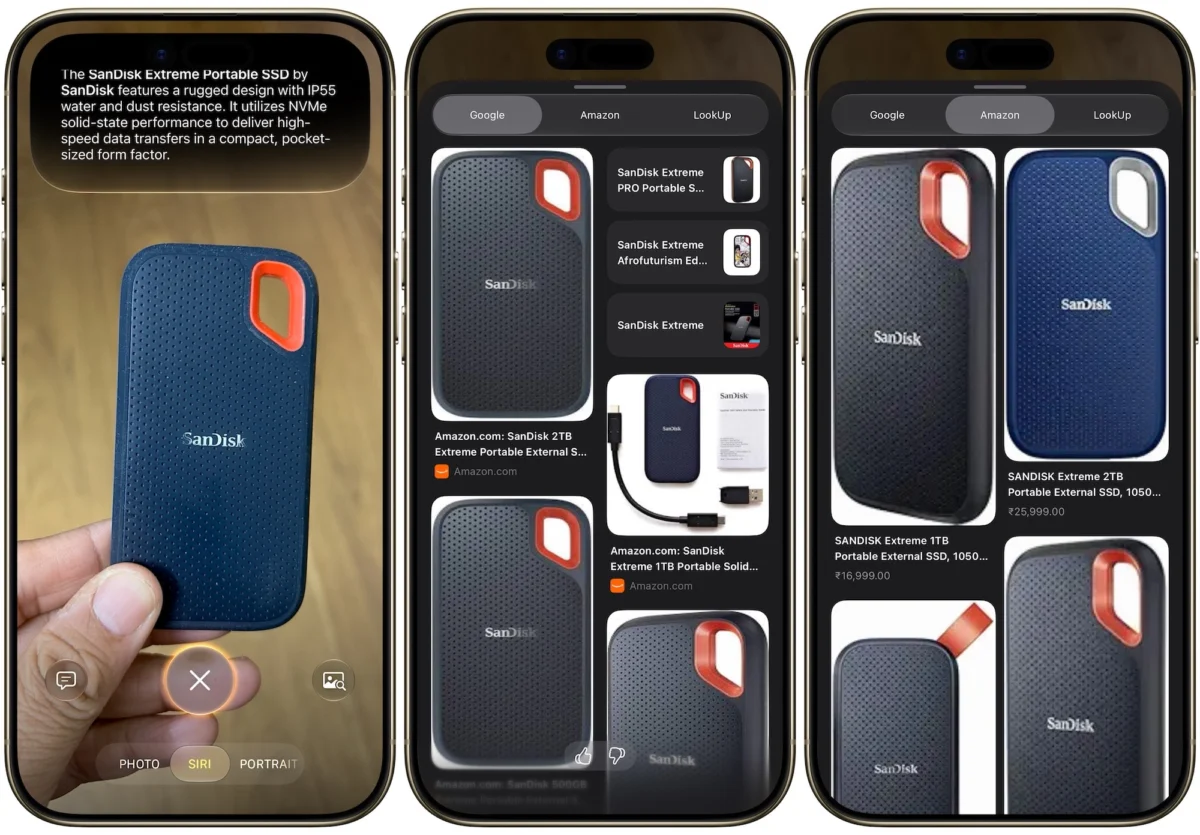
For years, the narrative surrounding Apple’s Siri was one of missed potential. Once the pioneer of the voice assistant market, Siri found itself eclipsed by the rapid advancements of Google Assistant and Amazon’s Alexa. As the industry pivoted toward generative AI, Siri’s command-and-response architecture began to feel like a relic of a bygone era. However, with the unveiling of "Siri AI" at WWDC 2026, Apple has signaled a definitive shift. By integrating sophisticated large language models and context-aware intelligence, Apple is no longer just playing catch-up—it is attempting to redefine the role of the personal assistant in our daily lives.

The Chronology of Change: From Stagnation to Transformation
The story of Siri is a study in iterative development. Launched in 2011 as a revolutionary feature on the iPhone 4S, Siri enjoyed several years of dominance. Yet, as the AI arms race accelerated, competitors like Google Gemini and ChatGPT began offering conversational depth that Siri simply could not match. Users grew frustrated with the assistant’s inability to maintain context or execute multi-step tasks across apps.

The turning point arrived in June 2026. Apple’s announcement of iOS 27 and the subsequent launch of Siri AI represented the most significant overhaul in the product’s history. Unlike previous iterations, which functioned as a static set of programmed triggers, the new Siri is built upon Apple’s proprietary Foundation Models. This shift marks the transition from a transactional tool to a proactive, conversational partner capable of understanding nuance, personal data, and cross-platform workflows.

Supporting Data: How Siri AI Works
The magic behind the new Siri lies in its architecture. Apple has utilized techniques derived from Google’s Gemini research to train smaller, more efficient models that run locally on Apple’s custom silicon. This architectural choice is a strategic one, prioritizing both performance and privacy.

The Power of Private Cloud Compute
One of the most significant concerns in the era of AI is data privacy. Apple has addressed this with "Private Cloud Compute." For tasks that require more power than the device can provide, data is processed in a specialized cloud environment that adheres to the same rigorous privacy standards as the local device. This ensures that sensitive information—whether from your Mail, Messages, or Photos—is never exposed or used to train public models.

Visual Intelligence
Beyond text and voice, the new Siri introduces "Visual Intelligence." By leveraging the iPhone’s camera, users can now point their device at a physical object to initiate a search, scan a membership barcode to automatically create a digital Wallet pass, or identify a product to find direct shopping links. This integration bridges the gap between the physical and digital worlds, a functionality that elevates Siri from a voice-only tool to an omnipresent digital interface.

Official Stance and Strategic Vision
Apple’s messaging regarding the new Siri is clear: it is designed to be "personal, private, and powerful." During the WWDC 2026 keynote, Apple executives emphasized that the goal was not to create another chatbot, but to create a "system-wide intelligence" that deeply understands the user’s specific context.

By allowing Siri to dig through local files—including Notes, Calendar, and Reminders—using natural language processing, Apple is solving the "fragmentation problem." Users no longer need to remember which app holds a specific piece of information; they simply ask Siri to find it. This represents a fundamental change in how users interact with their operating systems, moving away from app-centric navigation toward intent-centric navigation.

Implications for the User Experience
The integration of Siri AI has profound implications for how we interact with our devices. By allowing for a continuous conversation—where Siri remembers the context of previous questions—the assistant becomes significantly more useful.

The New Command Paradigm
While the new AI is more capable, the traditional command structure remains a pillar of efficiency. Whether you are managing your device settings, controlling your smart home via HomeKit, or using third-party integrations through Shortcuts, the new Siri is designed to be more flexible.

- Communication: Users can now dictate complex emails or messages with a conversational flow, rather than having to speak in stilted, robotic phrases.
- Scheduling: With the integration of natural language processing in Calendar and Reminders, creating complex events is as simple as saying, "Remind me to call the dentist next Tuesday after my morning meeting."
- Smart Home: Through HomeKit, Siri can now handle complex, multi-layered requests like "Set the living room for a movie night," which triggers a sequence of actions involving lighting, thermostat adjustments, and media playback.
Navigating the New Ecosystem
While the potential is vast, the rollout is not without its hurdles. To run these advanced models, users must have compatible hardware, specifically an iPhone 15 Pro or newer. This creates a clear, if potentially frustrating, delineation between the older user base and the new AI-ready generation. Furthermore, the reliance on English for the initial beta phase and the delayed availability in the European Union are reminders that even the most advanced technology is subject to regulatory and linguistic complexities.

Customization and Control
Despite these limitations, the degree of user control has increased. Through the Settings menu, users can now adjust Siri’s pace, expressiveness, and even create "Vocal Shortcuts." This accessibility feature allows users to map specific phrases to complex workflows, ensuring that the assistant can be tailored to individual physical or cognitive needs.

The Future of the Virtual Assistant
As we look toward the full public release of iOS 27 in September, the trajectory is clear: the age of the "dumb" voice assistant is over. Siri is evolving into a proactive, intelligent agent that resides at the heart of the Apple ecosystem.

For the average user, this means less time spent searching through apps and more time spent accomplishing goals. For the tech industry, it sets a new bar for how AI should be implemented: locally, privately, and contextually.

The transition will not be instantaneous, and there will undoubtedly be growing pains as the models learn to better interpret intent. However, the move toward a more conversational, memory-capable Siri is a necessary evolution. Whether it is managing a professional calendar, helping you find a photo from a specific trip, or simply providing a bit of levity when you are bored, the new Siri is finally becoming the assistant it was always meant to be.

As you prepare for the update, keep in mind that the best way to master the new Siri is through experimentation. The days of rigid, forced commands are behind us; the new era of AI-driven, natural interaction is just beginning. Explore the settings, build your own custom shortcuts, and don’t be afraid to test the boundaries of what this new intelligence can do. The landscape of mobile computing has changed, and for the first time in years, the crown of the "best voice assistant" is once again a subject of fierce and exciting debate.

 Azzam Bilal Chamdy
 Laily UPN