 Nana
Nana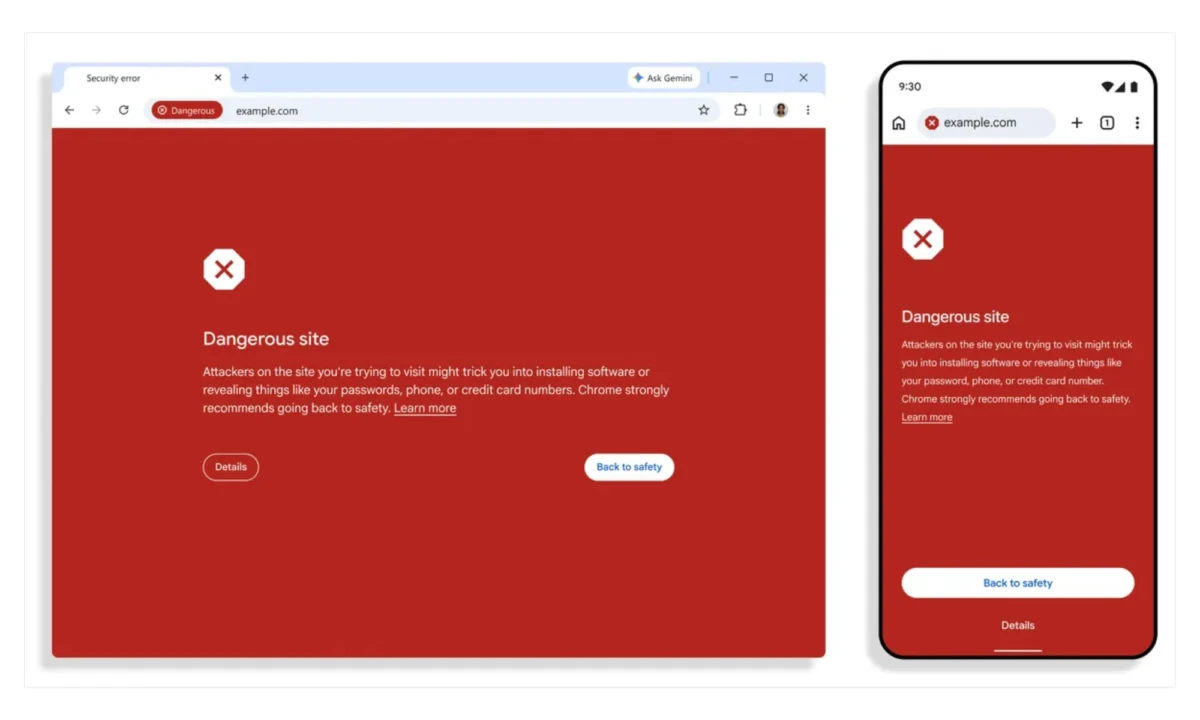
In an era where the internet is increasingly populated by sophisticated digital traps, Google is fundamentally evolving how its flagship browser, Chrome, protects its billions of users. For years, the iconic full-page red screen of Google’s Safe Browsing service has served as the final line of defense against confirmed malicious websites. However, as cybercriminals turn to increasingly subtle tactics—leveraging generative AI and complex social engineering—the line between "safe" and "malicious" has become dangerously blurred.
Recognizing this shift, Google has introduced a new "Suspicious Sites" classification within Chrome’s Enhanced Protection mode. This update represents a shift from reactive blocking to proactive warning, flagging websites that exhibit deceptive patterns even when the browser lacks definitive evidence of a direct threat.
The Evolution of Safe Browsing: A Chronology of Defense
To understand the significance of this update, one must look at the trajectory of Google’s security infrastructure.

- The Early Days (2007): Google launched the Safe Browsing API, initially designed to combat the rising tide of phishing and malware by maintaining a massive, constantly updated blacklist of known malicious domains.
- The Proactive Pivot (2020s): As web threats became more ephemeral—with websites appearing and disappearing in hours—Google introduced "Enhanced Protection." This mode shifted the heavy lifting from the user’s local device to Google’s cloud servers, allowing for real-time analysis of site behavior.
- The AI Integration (2024–2025): Google began integrating on-device machine learning models to detect suspicious patterns in real time.
- The "Suspicious" Tier (Late 2025–2026): With the latest update, Google is introducing a nuanced, intermediate security tier. This moves the browser away from a binary "Safe/Dangerous" model toward a spectrum of risk assessment.
Understanding the New "Suspicious" Classification
The core of this upgrade lies in how Chrome categorizes risk. Previously, if a site didn’t trigger a high-confidence alert, it was generally treated as benign, leaving a window of opportunity for sophisticated phishing campaigns to exploit unsuspecting users.
The new "Suspicious" category acts as a buffer. Under the Enhanced Protection mode, Chrome now monitors for common deceptive patterns—such as spoofed login pages, unusual domain structures, or pages that mimic legitimate e-commerce portals—that do not yet meet the threshold for a full-page red alert.
By distinguishing these sites from known, malicious ones, Google is providing users with "soft" warnings. These alerts use different colors, icons, and language, signaling to the user that while the site hasn’t been definitively flagged as a threat, it deviates from standard security norms. This allows users to exercise caution, particularly before entering credentials or financial data.

The Power Behind the Shield: Gemini and Cloud Intelligence
The technical backbone of this update is a significant migration in how Chrome processes security data. Google is transitioning from its previous on-device Gemini model to a more robust, server-side infrastructure.
Why Server-Side Processing Matters
By moving the analytical engine to the cloud, Chrome can now process significantly larger datasets. When a user navigates to a webpage, the browser can now perform a multi-layered verification process:
- Brand Representation: Does the page claim to be a specific entity, and does its domain or structure match that entity’s known patterns?
- Intent Analysis: Does the page structure suggest it is attempting to harvest data rather than provide information?
- Domain Reputation: Combining current signals with historical data to calculate the probability of a site being a "throwaway" domain used for short-term scam campaigns.
This cloud-based intelligence is significantly faster and more accurate than on-device processing, which is often constrained by local hardware limitations. It allows Google to push security updates to millions of users globally in seconds rather than waiting for client-side software updates.

Addressing the Rise of "ClickFix" Scams
One of the most persistent threats identified by security researchers over the past year is the "ClickFix" scam. These attacks trick users into believing they have encountered a system error, then guide them through a "fix" that involves copying and pasting malicious scripts into their terminal or browser console.
The new Chrome update specifically targets this behavior. If Chrome detects that a user is being prompted to copy a command or script that aligns with known malicious patterns, the browser will now intervene with an additional warning. This is a critical development, as it addresses a vulnerability that is entirely dependent on user error rather than browser-based security holes.
The Broader Implications for Web Security
The implications of this update are far-reaching for both everyday users and the cybersecurity landscape.

Empowering the Vulnerable
For users who are not technically proficient, the internet can be a minefield. AI-generated websites are now so convincing that even experienced users can be fooled by near-perfect replicas of banking or retail portals. By providing an "early warning" signal, Chrome acts as a digital advisor, prompting the user to pause and reconsider their actions before it is too late.
Deterrence and Economics
From a macro-perspective, this update changes the economics of cybercrime. If a scammer’s "conversion rate"—the number of people who fall for the trick—is lowered by 20% to 30% due to these warnings, the cost-benefit analysis for the attacker shifts. When it becomes harder to trick users, the profitability of these scams declines, potentially forcing criminal groups to move on to less lucrative targets.
The Privacy vs. Security Balance
It is important to note that this level of protection requires users to opt into "Enhanced Protection." This mode does involve sharing more telemetry data with Google, which serves as a trade-off for the heightened security. As digital threats evolve, this balance between user privacy and active protection will likely remain one of the most debated topics in browser development.

Conclusion: A New Standard for Browsing
Google’s decision to move beyond binary risk classification is a necessary response to the maturation of digital fraud. By incorporating server-side AI and a more nuanced warning system, Chrome is positioning itself not just as a viewer for the web, but as an active gatekeeper.
As we look toward the future, the success of this system will depend on its ability to minimize false positives—the "crying wolf" effect where users become desensitized to warnings because they are triggered too often. However, in an environment where AI-powered scams can be generated at an industrial scale, the risk of a false positive is increasingly seen as a price worth paying to prevent the catastrophic consequences of a successful credential theft.
For now, users should ensure their Chrome browser is updated and, if they are concerned about the growing sophistication of online scams, consider enabling Enhanced Protection. In the battle for digital safety, every layer of intelligence counts.

Quick Reference: Understanding Chrome’s Security Modes
- Standard Protection: The default mode for most users. It checks sites against a locally stored list of known malicious sites, updated every 30 minutes.
- Enhanced Protection: A higher-security tier that sends data to Google in real-time, leveraging the new "Suspicious Sites" detection and server-side AI to block threats that have not yet been blacklisted.
As digital threats continue to evolve, staying updated with your browser’s security features is the single most effective way to safeguard your online identity, financial assets, and personal information.

 Pevita Pearce
 Dwi Wanna