
 Azzam Bilal Chamdy
Digital storefronts have fundamentally changed how we consume entertainment, offering the convenience of instant access to a vast library of games. However, this convenience comes with a trade-off: the ease of a "one-click" purchase can often lead to accidental acquisitions, impulsive buys that fail to live up to the marketing hype, or forgotten subscription renewals. While digital products are often perceived as non-returnable, Microsoft has established a structured, albeit nuanced, framework for Xbox users to seek recourse. Understanding this system is essential for any gamer looking to protect their wallet from digital buyer’s remorse.
The Reality of Digital Refunds: What You Need to Know
It is a common misconception that digital purchases are final. While Microsoft does not offer a "no-questions-asked" return policy similar to some retail environments, they do provide a mechanism for customers to request refunds for digital games, applications, add-ons, and subscriptions.
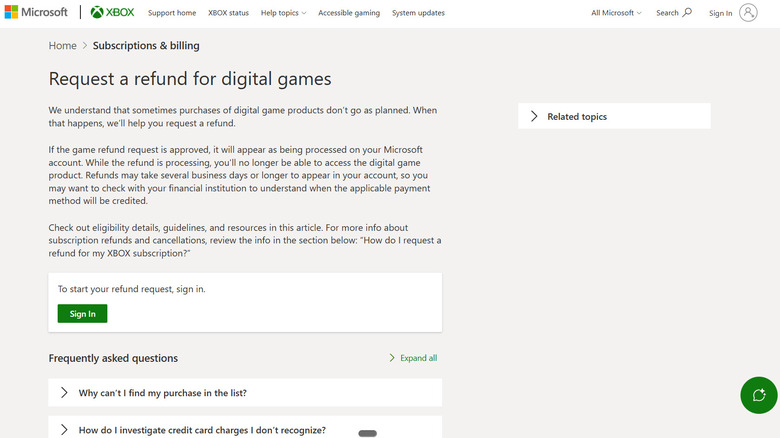
However, it is vital to manage expectations: an accidental purchase does not guarantee an automatic refund. Microsoft evaluates each request based on a set of criteria designed to prevent abuse of the system while remaining accommodating to genuine mistakes. The process is not handled directly on your console’s dashboard; rather, it is managed through the dedicated Xbox Support web portal, ensuring that each request is documented and reviewed according to the company’s internal guidelines.
Chronology of the Refund Process
Understanding the lifecycle of a refund request can help alleviate the anxiety that often accompanies a mistaken transaction. If you find yourself in a position where a refund is necessary, the timeline typically follows this trajectory:
- Immediate Realization: Upon noticing the error or the unwanted charge, it is best to act immediately. While you have a window of opportunity to request a refund, delaying only makes it more difficult to justify your claim.
- Submission: You must visit the official Xbox Support website. You will be required to sign in with the Microsoft account associated with the purchase. Once authenticated, you will navigate to your order history to select the item in question and initiate the request.
- The Review Phase: Once submitted, your request enters a processing period. Microsoft states that this initial evaluation can take up to 72 hours. During this time, an automated system—and potentially a human agent—reviews the transaction against the account’s history and eligibility criteria.
- Decision and Revocation: If the refund is approved, the digital product will be immediately revoked from your account. You will lose access to the game, app, or add-on, regardless of whether you had already downloaded or installed it.
- Financial Settlement: Following approval, the processing time for the funds to reappear in your account depends heavily on your bank or payment provider. While Microsoft typically processes the return within three to five business days, external financial institutions may add further delays.
Eligibility Criteria: The "Significant Playtime" Threshold
The most common point of contention for Xbox users is the eligibility requirement. Microsoft does not provide a hard-and-fast rule regarding the exact number of hours or minutes that constitute a "significant amount of playtime," which can lead to frustration for users who feel they haven’t "really" played a game.
The 14-Day and 90-Day Rule
Generally, Microsoft considers refund requests for digital games within 14 days of purchase, provided the user has not spent a significant amount of time with the title. This is the "sweet spot" for successful requests. However, the policy is flexible; users may submit requests up to 90 days after the purchase date. It is important to note that as the time since the purchase increases, the likelihood of a successful refund decreases significantly.
Exclusions and Limitations
Not all digital content is eligible for a refund. Most in-game consumables, virtual currencies, and specific types of digital content that have already been "consumed" or used are non-refundable. Furthermore, Microsoft reserves the right to impose limits on the number, type, and monetary value of refunds granted to an individual purchaser within a calendar year. This is a protective measure designed to prevent the digital storefront from being treated as a "rental service," where users might try to finish a short game and then request a refund.
Subscription Management: Beyond Simple Cancellations
Managing Xbox subscriptions, such as Game Pass, requires a different approach than requesting a refund for a standalone game. Often, users want to stop a recurring payment but mistakenly believe they must request a refund to do so.
Recurring Billing vs. Refunds
Turning off recurring billing is the primary tool for subscription management. By disabling this, you ensure that you are not charged for the next cycle, though you will maintain access to the service until your current paid period concludes. This is the recommended route if you simply no longer wish to subscribe.
However, if you have already been charged for a new period and wish to reclaim that money, the rules are stricter. A refund for a subscription may be granted if the request is made within 30 days of the initial purchase or before the first recurring billing date. Notably, Microsoft limits the refund of the most recent recurring charge to "one time per account for each Xbox subscription product." This "one-strike" policy means that users must be vigilant about managing their subscription settings before the renewal date.
Official Stance and Appeals
Microsoft’s policy is intentionally opaque in certain areas to allow for discretion. When a request is denied, it is often due to the system flagging the user for excessive refund requests or excessive playtime.
If your request is denied, the door is not necessarily closed. Microsoft provides a path for appeal by allowing users to reply directly to the email notification containing the decision. This is an opportunity to provide context—for example, if a child made an unauthorized purchase, or if there was a technical error that prevented the game from launching. You cannot, however, re-submit the exact same request through the standard automated portal; the appeal process is a manual review that requires direct communication with support staff.
Implications for the Modern Gamer
The current Xbox refund policy reflects the broader tension in the digital marketplace: the balance between consumer protection and the prevention of digital piracy and abuse. For the consumer, the implications are clear:
- Be Proactive: Review your transaction history regularly. If you see a charge you don’t recognize or a subscription you forgot to cancel, act within the 30-day window.
- Understand the "Why": Recognize that the system is designed to reward good-faith customers. Repeatedly buying games, playing them for a few hours, and requesting a refund will eventually lead to your account being flagged or banned from future refund eligibility.
- Keep Records: Always keep copies of your support tickets and communication with Microsoft. If a refund is approved but does not show up in your bank account after ten business days, having a reference number is essential for escalating the issue with your financial institution.
Ultimately, while the process may feel "fiddly" or bureaucratic at times, the existence of a formal refund pathway is a significant step forward from the early days of digital distribution. By understanding the rules—the 14-day window, the "significant playtime" ambiguity, and the subscription renewal policies—Xbox users can navigate the digital storefront with confidence, knowing that a momentary mistake does not have to result in a permanent loss of funds.


 Sagoh
Sagoh
 Asep Darmawan