Rifan Muazin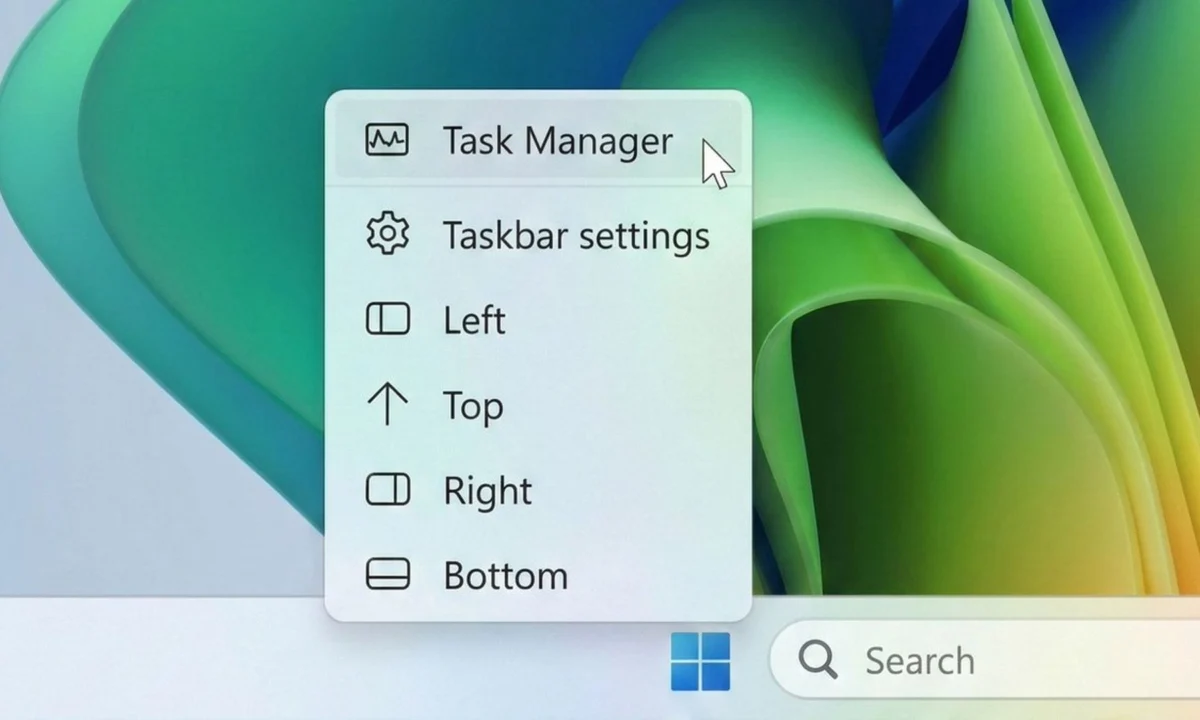
For years, the Windows taskbar has been the anchor of the desktop experience. It is the primary gateway to our files, our applications, and our workflow. However, since the release of Windows 11, users have been locked into a rigid design language—one that prioritized a modern, centralized aesthetic over the functional versatility that defined the operating system for decades.
That era of restriction appears to be coming to an end. In a significant shift for the Windows Insider program, Microsoft has begun testing a major overhaul of the taskbar and Start menu, signaling a return to the granular customization that power users have been demanding since 2021. This update represents more than just a minor interface tweak; it is a fundamental acknowledgment by Microsoft that a "one-size-fits-all" approach to UI design does not work for a user base as diverse as the global Windows community.
The Core Transformation: Restoring Flexibility
The most prominent change arriving in the latest experimental builds is the return of the "movable" taskbar. Under the current Windows 11 architecture, the taskbar is strictly tethered to the bottom of the screen. While this creates a symmetrical, centered look, it ignores the ergonomic and workflow preferences of millions of users who prefer a side-mounted or top-mounted taskbar to maximize vertical screen real estate.

In the new test builds, Microsoft is allowing users to detach the taskbar from its bottom-locked position. Users can now shift the bar to the top of the display or anchor it vertically along either the left or right side. While this functionality was a staple of Windows for years, its removal in Windows 11 felt, to many, like an unnecessary regression. By reintroducing this feature, Microsoft is bridging the gap between its new, modern design philosophy and the practical, proven utility of previous iterations.
Beyond simple positioning, Microsoft is addressing the needs of smaller form-factor devices. The company is testing various taskbar sizes, including a new "compact" mode. This is specifically designed for tablets and portable laptops, where every pixel of screen space is at a premium. By shrinking the taskbar footprint, Microsoft is ensuring that the OS remains usable and efficient, regardless of whether a user is operating on a 32-inch ultrawide monitor or a 10-inch portable tablet.
A Chronology of the Windows 11 Interface Tug-of-War
To understand why this update is so significant, one must look at the trajectory of Windows 11’s development:

- October 2021: Windows 11 launches with a focus on "centered" design. The Start menu and taskbar icons move to the center, drawing heavy criticism for the removal of traditional customization, including the ability to move the taskbar.
- 2022–2023: Microsoft doubles down on the new design language, focusing on "Mica" materials and rounded corners. Meanwhile, the Feedback Hub is flooded with thousands of requests for taskbar flexibility.
- Late 2024: Microsoft begins quietly experimenting with modular components within the OS shell, moving away from the monolithic code that made taskbar movement difficult to implement.
- March 2026: The first "Experimental" builds surface, revealing the re-introduction of side-bar functionality and Start menu resizing.
- May 2026 (Present): The features are expanded to a wider group of Insider testers, with refined controls for the "Recommended" section and profile visibility.
Supporting Data: Why Customization Matters
The push for this change is not merely based on aesthetic preference. User experience (UX) studies have long shown that productivity is heavily tied to the "fitts’s law" of user interface design—the time required to rapidly move to a target area is a function of the distance to the target and the size of the target.
For users with vertical monitors, a bottom-aligned taskbar is often a waste of horizontal space. A side-mounted taskbar, however, utilizes the otherwise empty vertical space on a wide monitor, allowing for more browser content or document space. By restricting this, Microsoft was inadvertently forcing a workflow that was less efficient for a significant portion of its professional user base.
Furthermore, internal metrics from the Windows Insider feedback loop highlight that "Personalization" is consistently one of the top three categories for user feature requests. When Microsoft ignored these requests in the initial Windows 11 rollout, it created a perception of a company that was out of touch with its core power users. This pivot back toward flexibility serves as a quantitative response to qualitative user frustration.

Redefining the Start Menu: A More Intelligent Interface
The Start menu is also receiving a substantial facelift. For years, the "Recommended" section—which displays recently accessed files and applications—has been a point of contention. Many users found it cluttered and difficult to manage.
Microsoft is now introducing granular controls that allow users to toggle specific sections of the Start menu on or off. Users can now choose to hide the "Recommended" list entirely, or focus exclusively on "Pinned" apps. In a move to improve transparency, Microsoft is officially renaming the "Recommended" section to "Recent." This terminology is far more accurate, as the feature primarily tracks local file history and recently installed software.
Privacy has also been a focal point of these changes. In the latest update, users are granted the ability to hide their profile photo and account name from the top of the Start menu. While this may seem like a minor aesthetic adjustment, it serves a critical function for professionals who frequently share their screens during remote meetings. It allows for a "clean" interface that prevents accidental leakage of personal information, reflecting a more mature understanding of the modern, hybrid-work environment.

Official Responses and Strategic Implications
While Microsoft has not issued a singular, grand press release regarding these specific UI changes, their actions in the Insider channels speak volumes. By moving these features into the "Experimental" channel, Microsoft is performing "A/B testing" to see how these changes affect system performance and user engagement.
Industry analysts suggest that this shift is part of a broader "Windows 12" preparation strategy. By decoupling the shell components—such as the taskbar and Start menu—from the core OS kernel, Microsoft is making the Windows experience more modular. This modularity allows them to push UI updates faster without risking the stability of the entire system.
"The goal is to provide a platform that feels like it belongs to the user, not the manufacturer," a source close to the Windows development team noted. "We spent the last few years defining what Windows 11 is. Now, we are spending this year defining how it can adapt to the user."

The Road Ahead: What to Expect
For those currently using the stable build of Windows 11, these features are not yet available. Microsoft typically runs these features through the Insider program for several months to identify potential bugs, particularly those related to how the taskbar interacts with full-screen applications or multi-monitor setups.
When these features eventually roll out to the general public, they will likely come as part of a "Moment" update—the smaller, feature-focused patches that Microsoft has used to deliver iterative improvements to Windows 11 throughout its lifecycle.
Key Takeaways for the Future:
- Ergonomics: The return of the side-mounted taskbar is a win for ergonomic setups and ultra-wide monitor users.
- Privacy: New controls for profile management and Start menu content demonstrate a stronger focus on user security.
- Productivity: A more modular Start menu means less time searching for apps and more time focusing on tasks.
As we look toward the future of the Windows ecosystem, this update serves as a reminder that even the most powerful tech giants are susceptible to the demands of their community. By finally loosening the reins on the Windows 11 interface, Microsoft is proving that they are willing to admit when a "modern" design needs a touch of "classic" functionality.

For the millions of users who felt alienated by the initial rigidity of Windows 11, this update is more than just a software patch—it is a promise that their feedback is being heard, analyzed, and ultimately, implemented. The PC should be a tool that adapts to the user, and with these changes, Windows 11 is finally taking a significant step toward achieving that goal.

 Ammar Sabilarrohman
 Asro
Asro