Rifan Muazin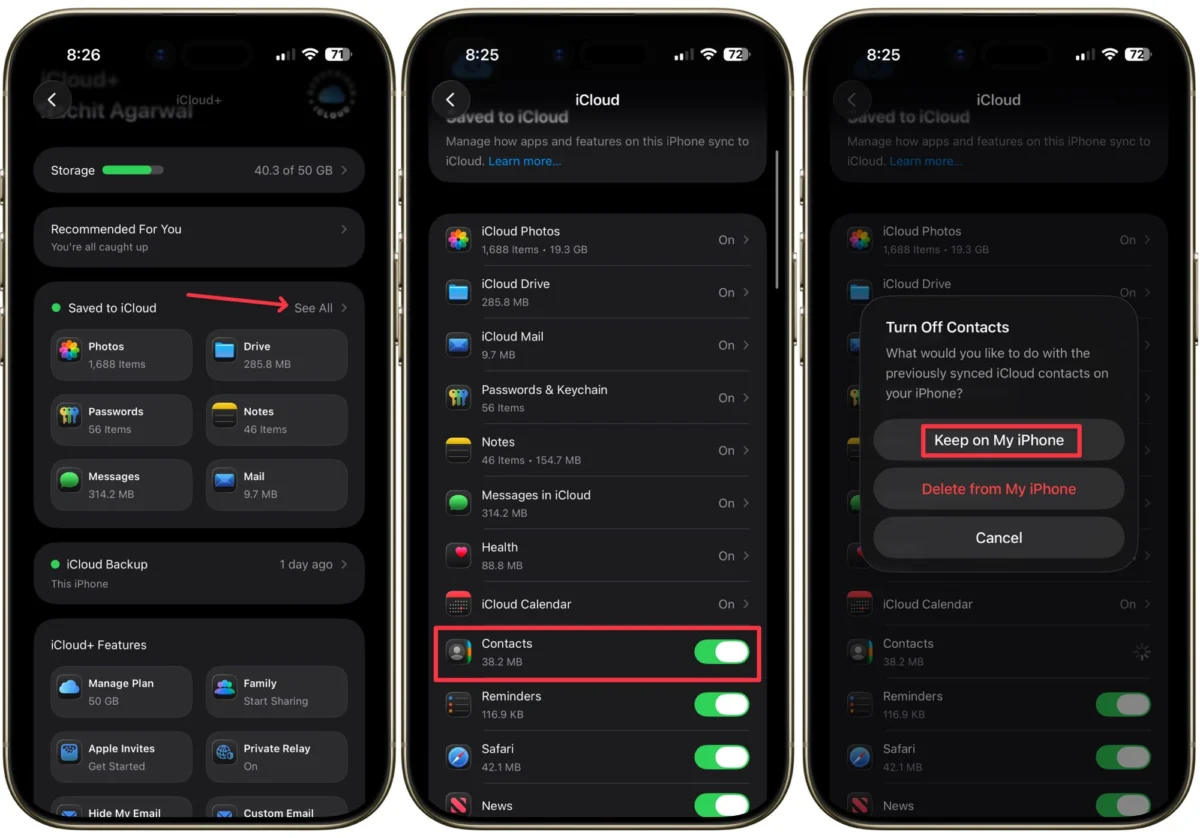
In the modern digital era, our smartphones have become the primary repositories of our personal and professional lives. We have offloaded the cognitive burden of memorizing phone numbers to our devices, trusting that our contact lists will remain constant, accurate, and accessible. Because we no longer commit these sequences of digits to memory, the sudden disappearance of our contacts—whether triggered by a botched iOS update, a synchronization glitch, or an accidental deletion—can trigger a state of genuine panic.
Losing a contact list is not merely an inconvenience; it is a disruption of one’s ability to communicate, work, and manage personal affairs. Fortunately, Apple’s ecosystem is built with robust recovery redundancies. If you find your contact list empty, there is no need to begin the arduous process of manually requesting numbers from friends and colleagues. By following systematic recovery protocols, you can restore your data efficiently.

The Anatomy of the Issue: Why Contacts Vanish
Before diving into the recovery steps, it is essential to understand why this phenomenon occurs. Most contact-related issues stem from the way iOS interacts with iCloud.
- Synchronization Conflicts: When multiple devices are signed into the same Apple ID, a sync conflict can occasionally occur, causing the cloud server to "override" the local data on your iPhone with a blank or outdated version.
- Software Update Residuals: Occasionally, a major iOS update can temporarily suspend background syncing services, making it appear as though data has been erased when it is actually just hidden.
- Account Sign-out Errors: If a user accidentally signs out of their primary iCloud account, the iPhone may purge the cached data, leading to a sudden empty contact list.
- Human Error: Accidental deletion remains the most common cause, particularly when managing multiple accounts (e.g., Gmail, Outlook, and iCloud) within the same contact app.
Chronology of Recovery: A Step-by-Step Approach
When your contact list appears empty, timing is critical. The sooner you intervene, the higher the likelihood of a seamless restoration.

Method 1: The iCloud Toggle Refresh
This is the "first responder" of technical fixes. It forces the iPhone to re-establish a handshake with Apple’s servers, often pulling the existing data back from the cloud.
- Accessing Settings: Navigate to the Settings app on your iPhone. Tap your Apple ID name at the top of the menu to enter the iCloud ecosystem.
- The Sync Toggle: Locate the "Apps Using iCloud" section and tap See All. Find Contacts in the list.
- The Power Cycle: Toggle the switch to Off. A prompt will appear asking what to do with the existing contacts on your device. Select "Keep on My iPhone." This ensures that if there is a local cache, it remains safe.
- Re-synchronization: Wait approximately 30 seconds, then toggle the switch back to On. Select Merge when prompted. This command tells the phone to reconcile its local storage with the cloud, effectively "re-discovering" the contacts that were previously hidden.
Method 2: Deep Recovery via iCloud.com
If the simple toggle fails, you must access the server-side archives directly. Apple maintains an "archived" state of your data, allowing you to "roll back" your contacts to a previous version.

Note: If you have enabled Advanced Data Protection, you must first authorize web access.
- Enabling Web Access: Go to Settings > [Your Name] > iCloud. Scroll to the bottom and select iCloud.com. Toggle "Allow Data Access" to the On position.
- Web Portal Login: Open Safari and navigate to iCloud.com. Sign in with your Apple ID credentials.
- Data Recovery Suite: Once logged in, tap the Menu (three dots) or the grid icon. Navigate to Data Recovery and select Restore Contacts.
- Version Selection: You will be presented with a list of historical archives. Select the date and time immediately preceding the loss of your data. Click Restore.
Supporting Data: Understanding Apple’s Infrastructure
Apple’s architecture for data management is built on the premise of high-availability. When a user restores contacts from an iCloud archive, the system creates a temporary snapshot of the current contacts before replacing them with the restored version. This prevents permanent data loss during the restoration process itself.

According to industry benchmarks, the "Merge" function is the most efficient method for 90% of sync-related issues. The "Restore from Archive" function, however, is the gold standard for users who have suffered a true data deletion event.
Official Responses and Security Considerations
Apple’s official stance on data management emphasizes the role of the user as the custodian of their data. In recent updates, such as iOS 26.4, Apple has moved toward a "Security-First" approach, where features like Advanced Data Protection are now encouraged or, in specific contexts, automatically enabled.

Important Security Warning: When restoring data from the web, ensure you are only using official Apple interfaces. Avoid third-party "Data Recovery" applications that claim to scan your iPhone; these apps often require permissions that could compromise your privacy or lead to further data corruption. Always stick to the native Apple tools, as they are specifically designed to interact with the encrypted nature of the iCloud backup file system.
Implications of Data Loss and Mitigation
The psychological impact of losing one’s contact list—the "digital Rolodex"—is profound. In a business context, it can result in the loss of critical leads, client communication history, and networking connections.

Best Practices for Future-Proofing:
- Enable Automatic Backups: Ensure that iCloud Backup is toggled to "On" in your iCloud settings. This creates an automated nightly snapshot of your entire device, not just your contacts.
- Diversify Syncing: While iCloud is excellent, consider keeping a secondary source for your contacts, such as a Gmail or Exchange account. If you store your contacts within a Gmail account, you can simply add the account back to your iPhone, and the contacts will reappear instantly.
- Regular Maintenance: Every few months, export a "vCard" file of your contacts to a secure cloud drive like Google Drive or Dropbox. This serves as an "offline" insurance policy.
- Understand Advanced Data Protection: If you use this feature, remember that you are the sole holder of the encryption keys. If you lose your recovery key or trusted device, Apple cannot recover your data for you. Always store your recovery key in a physical, secure location.
Conclusion
Losing your contacts is a jarring experience, but it is rarely a terminal one. By understanding how your iPhone communicates with iCloud—and by utilizing the built-in recovery tools—you can resolve the issue within minutes.
The most significant takeaway is that data management is a proactive, not reactive, process. By treating your contact list as a valuable asset that requires periodic maintenance and backup, you ensure that even in the event of a device failure or a sync error, your digital network remains intact. Think of these recovery methods as your digital insurance policy: you hope you never have to use them, but you will be profoundly relieved that they are there when you do.

Stay diligent, keep your devices updated, and never underestimate the importance of a secondary backup. Your future self will thank you for the extra few minutes spent securing your data today.

 Reynand Wu
 Asep Darmawan